
The problem with paper rating forms
Paper gets missed, returned late, or entered inconsistently. That makes it hard to compare performance across raters and harder to defend decisions during reviews. SimKlar keeps the rating workflow simple—and the record centralized.
Works offline—syncs when connected
Rate in the sim lab even when Wi-Fi is unreliable. Ratings upload automatically once the device reconnects.
On-screen anchors reduce rating drift
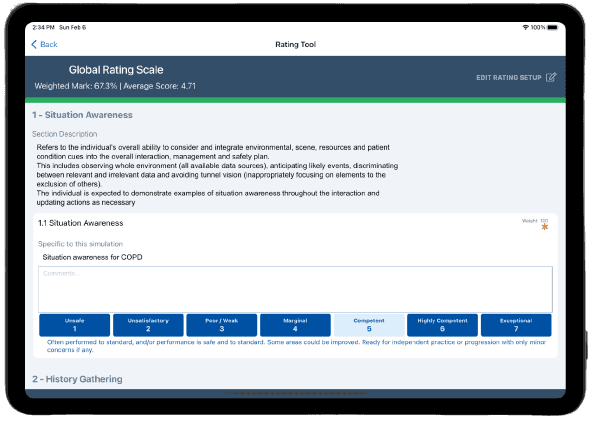
Each domain includes simulation-specific anchors so facilitators share a common standard for what performance levels look like.
Fast checklist scoring
Use weighted checklists to calculate totals automatically. Facilitators focus on observation and feedback—SimKlar handles the math.
Scenario context stays with the rating
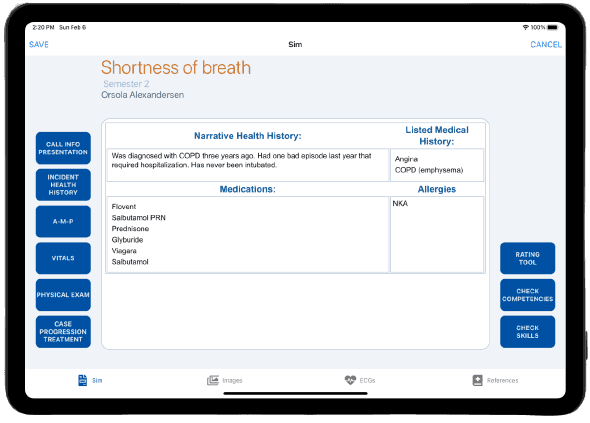
Facilitators can view scenario details, attachments, and mapped competencies in the same place they score—no separate binders or print packs.
Rate multiple roles in one session
Capture performance for the lead candidate and partner (or team roles) during the same run, without duplicating paperwork.
Feedback is available sooner
Once synced, students can view scores and comments while the experience is still fresh—supporting timely practice and remediation.
How offline iPad rating works
Sync iPads before the lab
Facilitators download the scenarios, anchors, and checklists ahead of time. Devices are ready even if connectivity drops during the session.
Facilitators rate during the simulation
Open the scenario, score using anchors, complete checklists, and add comments. The workflow is guided and consistent across raters.
Sync and review centrally
When the device reconnects, ratings upload automatically. Faculty can review results, and students can access feedback.